AWS Performance Tuning Explained: How to Fix Application Slowdowns and Improve Reliability at Scale

Key Highlights:
- Application slowdowns in AWS environments often lead to unplanned downtime, rising cloud costs, and degraded user experiences during peak traffic periods.
- Teams that delay performance optimization risk accumulating technical debt, over-provisioned infrastructure, and increasing operational inefficiencies over time.
- With cloud infrastructure spending continuing to grow rapidly, businesses need cost-aware AWS performance engineering strategies to maintain scalability and reliability.
- Sigma Infosolutions helps engineering and DevOps teams diagnose and resolve AWS performance issues through structured AWS Cloud Solutions engagements backed by its AWS Select Technology Partner expertise.
Why Application Slowdowns on AWS Are Harder to Diagnose Than They Appear
AWS performance tuning is not a single action but a process of isolating variables across compute, network, storage, and application layers. Engineering teams frequently misattribute slowdowns to the wrong layer, applying fixes at the infrastructure level when the actual bottleneck exists in the application code or database query patterns. This misdiagnosis wastes time and often introduces new configuration risks without resolving the original problem.
The distributed nature of AWS environments makes this diagnosis more complex than it would be in a traditional data center. A latency spike visible to end users may originate in an overloaded EC2 instance, a poorly configured load balancer, an inefficient Lambda function, or a database connection pool that has reached its limit. Without systematic monitoring and tracing across all layers, the root cause can remain hidden even after significant investigation.
Resolving these issues requires a structured approach that begins with visibility, not with changes. Teams that attempt to fix application slowdowns without first establishing a baseline of metrics and traces are likely to introduce new variables that make the problem harder to reproduce and diagnose.
The Core Components of AWS Performance Tuning
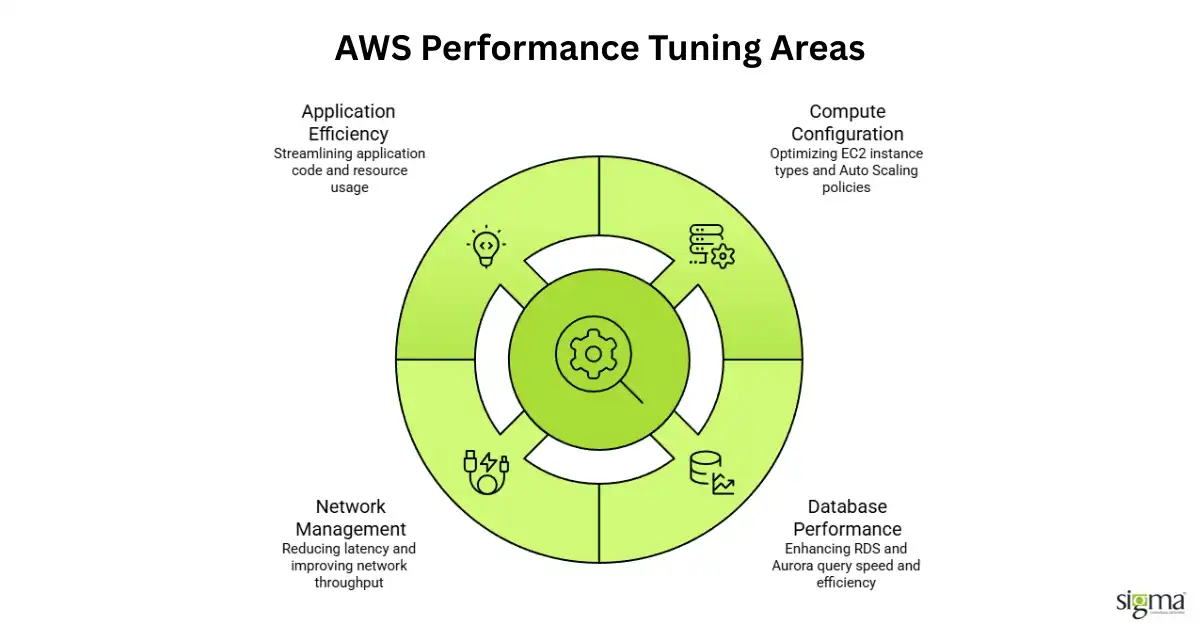
Effective AWS performance tuning addresses four primary areas: compute configuration, database performance, network and latency management, and application-level efficiency. Each area contributes to overall AWS reliability, and a deficiency in any one of them can negate improvements made in the others.
Compute and Auto Scaling Configuration
EC2 instance sizing is one of the most common sources of application performance problems in AWS environments. Organizations frequently select instance types based on initial cost estimates rather than actual workload profiles, resulting in either under-provisioned instances that cannot handle traffic spikes or over-provisioned instances that consume budget without delivering proportional performance.
Auto Scaling addresses the traffic spike problem, but only when configured correctly. Scaling policies that rely on CPU utilization alone often respond too slowly to sudden demand increases, particularly for I/O-intensive workloads where CPU usage remains moderate even as the application struggles. Custom metrics, such as request queue depth or active connection count, provide more accurate signals for AWS scaling decisions.
Database Performance and Query Optimization
RDS and Aurora performance issues are among the most impactful application slowdowns in AWS environments. Slow queries, missing indexes, and connection pool exhaustion can cause response times to degrade sharply under moderate load, even when the underlying database instance is appropriately sized.
AWS provides tools such as Performance Insights and Enhanced Monitoring to identify long-running queries and wait events at the database level. These tools should be reviewed regularly, not only when a performance issue is reported. Establishing a query review cadence as part of normal operations prevents individual slow queries from becoming systemic bottlenecks as data volumes grow.
Read replicas reduce the load on the primary database instance for read-heavy workloads, and ElastiCache can eliminate database calls entirely for frequently accessed data. Both strategies are standard components of performance improvement work in AWS environments and should be evaluated before scaling up the primary database instance.
Can AWS Pipelines Enable Zero-Disruption Cutovers? Read the blog to know more
Monitoring and Observability: The Foundation of Cloud Optimization
Cloud optimization efforts fail when teams lack sufficient visibility into how their systems behave under load. AWS CloudWatch provides the baseline for metric collection and alerting, but it is most effective when combined with distributed tracing tools such as AWS X-Ray, which connects a single user request to every service it touches across the architecture.
The following table outlines the primary AWS monitoring and tuning tools, their function, and where each applies in a performance investigation.
AWS Tool | Primary Function | Performance Use Case |
| AWS CloudWatch | Metrics, logs, and alarms | Baseline monitoring, alerting on thresholds |
| AWS X-Ray | Distributed tracing | Identifying latency across microservices |
| RDS Performance Insights | Database query analysis | Isolating slow queries and wait events |
| AWS Compute Optimizer | Instance sizing recommendations | Right-sizing EC2 and Lambda resources |
| AWS Trusted Advisor | Configuration best practices | Flagging over-provisioned or idle resources |
| Elastic Load Balancing metrics | Request distribution analysis | Diagnosing uneven traffic distribution |
Establishing dashboards that combine metrics from multiple tools into a single view significantly reduces the time required to identify the source of application slowdowns. Teams that rely on tool-by-tool inspection during an incident spend more time correlating data than addressing the problem.
Read our success story: AI-Driven Mortgage POS Modernization Using AWS and Next.js
Network Latency and AWS Reliability at the Architecture Level
Network configuration contributes to application slowdowns in ways that are often overlooked during initial architecture design. VPC routing, security group rules, and the placement of resources across availability zones all affect how data moves through an AWS environment and how quickly services can communicate with each other.
AWS reliability depends in part on how well an architecture distributes risk across failure domains. Applications that place all workloads in a single availability zone are vulnerable to partial outages that AWS’s own infrastructure is designed to isolate. Multi-AZ deployments for RDS, combined with load balancer health checks and failover routing, form the baseline for production-grade AWS reliability.
CloudFront, AWS’s content delivery network, addresses latency for geographically distributed users by caching content at edge locations close to the end user. For applications serving global audiences, the difference in response time between a direct origin request and a cached CloudFront response can be several hundred milliseconds per request, which accumulates meaningfully across high-traffic sessions.
How Sigma Infosolutions Approaches AWS Performance Tuning
AWS-Backed Engineering for Performance and Reliability
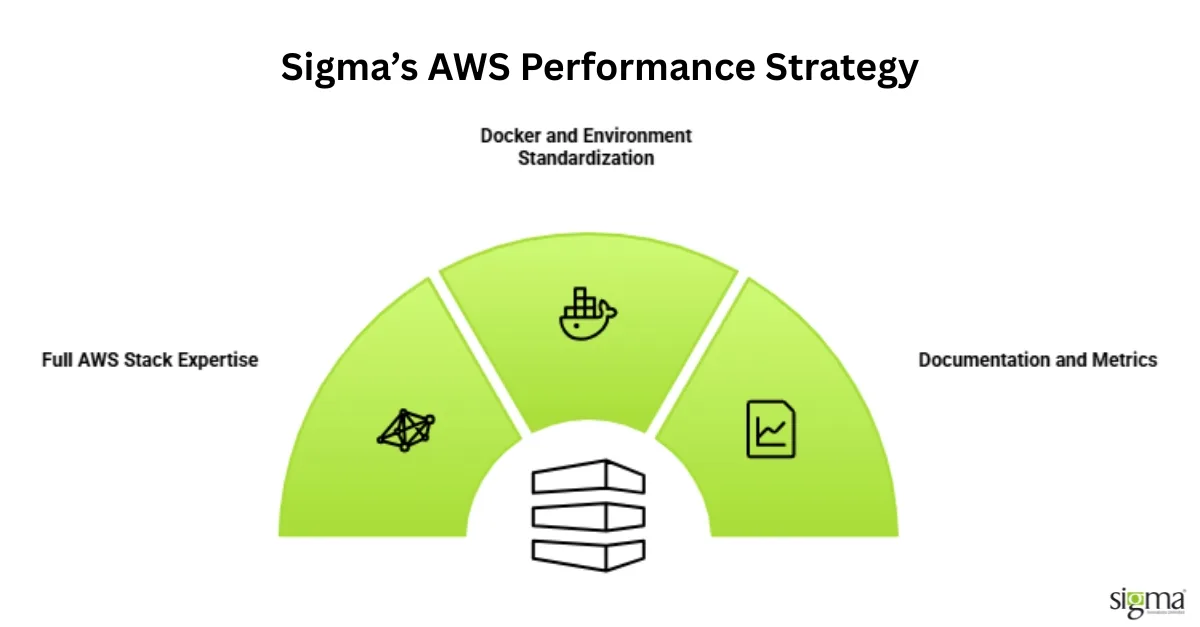
As an AWS Select Technology Partner, Sigma Infosolutions helps businesses improve application reliability, reduce latency, and optimize infrastructure costs through structured AWS Cloud Solutions. Instead of isolated fixes, Sigma combines cloud engineering, DevOps, and application expertise to identify performance bottlenecks across the entire AWS ecosystem.
Infrastructure Audits Aligned with AWS Best Practices
Sigma begins every engagement with a detailed infrastructure assessment mapped against the AWS Well-Architected Framework. This helps teams uncover gaps in:
- Performance efficiency
- Reliability and fault tolerance
- Security and compliance
- Cost optimization
The outcome is a prioritized remediation roadmap focused on measurable performance improvements rather than generic recommendations.
Full-Stack AWS Performance Optimization
Sigma’s engineering teams work across core AWS services to resolve slowdowns at the source:
- EC2 & ECS: Optimize compute workloads and scaling strategies
- RDS & Aurora: Improve database performance and query efficiency
- Lambda: Reduce cold starts and execution latency
- ElastiCache: Minimize repeated database calls
- CloudFront: Improve global content delivery speeds
This layered approach ensures AWS Cloud Solutions improve both infrastructure stability and application responsiveness.
DevOps-Driven Environment Consistency
Performance issues often stem from inconsistencies between development, staging, and production environments. Sigma uses:
- Docker-based containerization
- Standardized deployment pipelines
- Automated testing workflows
- Infrastructure-as-Code practices
These practices reduce environment drift and enable faster, safer deployments at scale.
Application-Aware Cloud Optimization
Unlike infrastructure-only providers, Sigma evaluates AWS performance in the context of real application behavior. For eCommerce platforms, lending systems, and high-traffic applications, engineering teams analyze:
- Traffic patterns under load
- Database interactions
- API response bottlenecks
- Scaling behavior during peak usage
This ensures AWS Cloud Solutions support long-term business growth, not just short-term fixes.
Transparent Reporting and Continuous Monitoring
Every engagement includes:
- Baseline performance benchmarking
- Before-and-after optimization metrics
- Monitoring and observability setup
- Documentation of infrastructure changes
Clients gain visibility into how improvements impact application reliability, scalability, and AWS spend over time.
Conclusion
Effective AWS performance tuning helps businesses improve reliability, reduce latency, and control cloud costs at scale. With the right AWS Cloud Solutions strategy, organizations can proactively identify bottlenecks, optimize infrastructure, and deliver consistent application performance as demand grows.
Frequently Asked Questions
Q: What is AWS performance tuning, and why does it matter for production applications?
A: AWS performance tuning is the process of identifying and resolving configuration, infrastructure, and application-level issues that cause degraded response times or service instability in AWS environments. It matters because unresolved performance problems increase cloud costs, reduce user satisfaction, and create cascading failures under load.
Q: How do I identify the root cause of application slowdowns in AWS?
A: The most reliable approach is to combine CloudWatch metrics with distributed tracing through AWS X-Ray to correlate user-facing latency with activity across individual services. Application slowdowns are rarely caused by a single component, so tracing the full request path is necessary to isolate the actual bottleneck.
Q: What AWS tools support cloud optimization and cost reduction at the same time?
A: AWS Compute Optimizer analyzes actual utilization data and recommends right-sized instance types that reduce cost without sacrificing application performance. AWS Trusted Advisor complements this by flagging idle resources, open security risks, and service limit exposures that affect both cloud optimization and reliability.
Q: How does AWS scaling help prevent performance degradation during traffic spikes?
A: AWS scaling, configured through Auto Scaling groups with appropriate custom metrics, allows the infrastructure to add capacity before CPU or memory thresholds become critical. Policies based on request queue depth or active connection count respond faster to sudden demand increases than standard CPU-based triggers.
Q: What is the difference between vertical and horizontal scaling on AWS?
A: Vertical scaling increases the size of an existing instance, while horizontal scaling adds more instances to distribute the workload. Horizontal scaling is generally preferred for production environments because it improves both performance and fault tolerance without creating a single point of failure.
Q: How does database configuration affect application performance on AWS?
A: Poorly optimized queries, missing indexes, and connection pool exhaustion are among the most frequent causes of application performance degradation in AWS-hosted applications. RDS Performance Insights identifies the specific queries causing the most load, allowing engineering teams to address the highest-impact problems first.
Q: What steps improve AWS reliability for applications that cannot tolerate downtime?
A: Multi-AZ deployments for databases, combined with load balancer health checks and automated failover routing, form the architectural baseline for AWS reliability in high-availability environments. Applications should also implement circuit breakers and retry logic at the service level to handle partial failures without cascading across the system.
Q: How long does an AWS performance improvement engagement typically take?
A: The timeline depends on the complexity of the architecture and the number of layers involved, but most structured performance improvement engagements for mid-market applications are completed within four to eight weeks. Initial audit findings are typically available within the first week, allowing remediation work to begin before the full assessment is finalized.