Salesforce Flow for Lead Nurturing: How to Automate Follow-Ups and Drive More Conversions

Key Highlights
- Organizations relying on manual lead follow-ups risk delayed responses, inconsistent outreach, and lost conversions to faster-moving competitors.
- Slow response times and unstructured nurturing workflows directly reduce lead qualification rates and weaken pipeline efficiency.
- Sigma Infosolutions enables business teams to automate follow-ups using Salesforce Flow, enforcing structured lead management and driving faster, more consistent conversions across the funnel.
Why Manual Follow-Up Processes Fail Sales Teams
Sales teams operating without structured automation frequently encounter the same problem: qualified leads go cold because follow-up activities depend on individual memory, calendar reminders, or spreadsheet-based tracking. Salesforce Flow addresses this problem by replacing ad hoc outreach with rule-based automation that executes actions at the right time, based on defined triggers and data conditions. The result is a consistent, repeatable process that does not depend on a salesperson remembering to act.
The challenge is not a lack of intent but a lack of infrastructure. When a sales team manages dozens of active leads simultaneously, the cognitive load of tracking follow-up timing across every contact becomes unmanageable. Automation removes that burden while preserving the human relationship at the center of the sales interaction.
What Salesforce Flow Does and How It Works
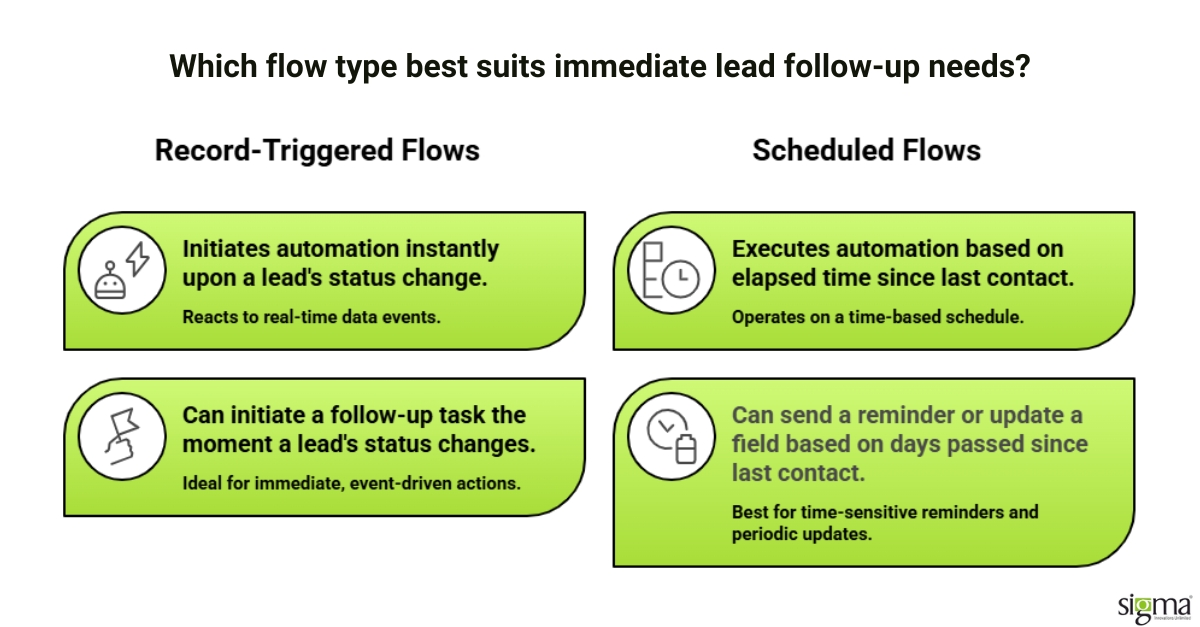
Salesforce Flow is a native automation tool within the Salesforce platform that allows administrators and developers to build complex, multi-step processes without custom code in most scenarios. It supports several flow types, including screen flows for guided user interactions, record-triggered flows for actions based on data changes, and scheduled flows for time-based processes.
For lead nurturing specifically, Record-Triggered Flows and Scheduled Flows are the most frequently used configurations. A Record-Triggered Flow can initiate a follow-up task the moment a lead’s status changes, while a Scheduled Flow can send a reminder or update a field based on how many days have passed since the last contact. These two flow types, used in combination, create a comprehensive automation layer for the full lead lifecycle.
Salesforce Flow also supports branching logic, which allows a single flow to take different actions depending on the data it evaluates. For example, a flow can assign a high-priority task to a senior account executive when a lead meets specific qualification criteria, while routing standard leads through a different follow-up sequence.
Read to know: How Salesforce Process Alignment Drives Successful Business Planning
Automating Follow-Ups: Key Use Cases for Lead Nurturing
The following table outlines common lead nurturing scenarios, the Salesforce Flow type applicable to each, and the expected outcome when the automation is correctly configured.
| Lead Nurturing Scenario | Salesforce Flow Type | Automated Action | Expected Outcome |
| New lead created in CRM | Record-Triggered Flow | Assign follow-up task within 1 hour | Faster initial contact, higher qualification rate |
| Lead status changes to “Contacted.” | Record-Triggered Flow | Schedule second follow-up in 3 days | Consistent multi-touch outreach |
| No activity for 7 days | Scheduled Flow | Send internal alert to assigned rep | Prevents leads from going cold unnoticed |
| Lead reaches “Qualified” stage | Record-Triggered Flow | Notify account executive and log activity | Faster handoff from SDR to AE |
| Email link clicked (via marketing integration) | Platform Event-Triggered Flow | Update lead score and reassign priority | More accurate lead prioritization |
Each of these automations can be built natively within Salesforce without third-party middleware, provided the org is configured correctly and the underlying data model supports the required field conditions.
Also, read : Salesforce Headless 360: Why “Logging In” Is Becoming Optional
Structuring a Lead Management Process Within Salesforce Flow
Effective lead management through Salesforce Flow requires more than building individual automations. It requires a clearly defined lead lifecycle model that maps each stage to a specific set of automated actions and owner responsibilities.
The first step is to audit the existing lead stages in Salesforce and confirm that they accurately reflect how the business qualifies and progresses prospects. Many organizations inherit default Salesforce configurations that do not align with their actual sales motion, which can cause automation logic to trigger at incorrect stages. Correcting the data model before building flows prevents the most common source of automation errors.
Once the lead stages are correctly structured, flows should be built incrementally, beginning with the highest-impact scenarios such as initial response time and stale lead alerts. Each flow should be tested in a sandbox environment before deployment to production, and field-level validation rules should be confirmed to ensure that required data is always available when a flow attempts to execute.
Read to know: Salesforce Integration – Essential Best Practices for Growth
Integrating Salesforce Flow With Email and Task Automation
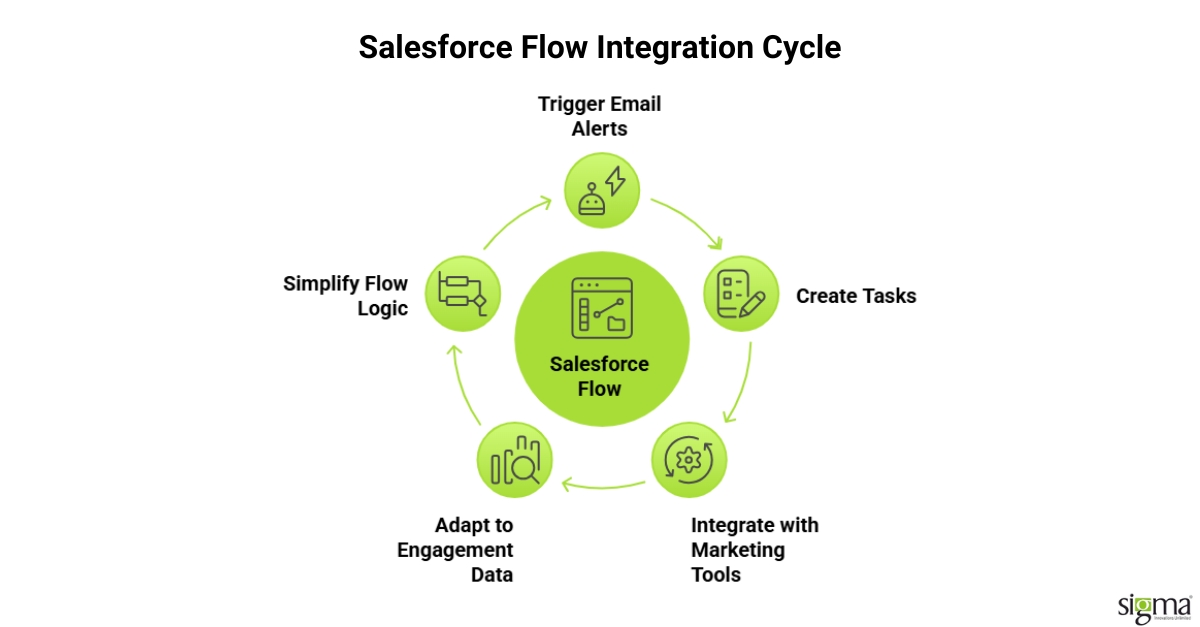
Salesforce Flow integrates directly with Salesforce’s built-in email alert actions and task creation capabilities, which allows follow-up sequences to operate without a separate marketing automation tool. For organizations already using Salesforce as their primary CRM, this native approach reduces the number of systems involved in the lead nurturing workflow and simplifies troubleshooting when an automation does not fire as expected.
For teams that require more sophisticated email sequencing, Salesforce Flow can trigger actions within connected tools such as Salesforce Marketing Cloud or Pardot through platform events and outbound messages. This expands the scope of what “automated follow-ups” means in practice, from simple task creation to multi-channel nurturing sequences that adapt based on prospect engagement data.
The key principle in designing these integrations is to keep the flow logic as simple as possible at each decision point. Overly complex branching within a single flow increases the risk of unintended behavior and makes future modifications more difficult for the team managing the configuration.
Read our success story: Unifying Multi-Org Operations with Salesforce-to-Salesforce Integration for a specialty finance company
How Sigma Infosolutions Delivers Salesforce Flow–Driven Sales Transformation
Salesforce Flow is only as effective as the strategy, architecture, and governance behind it. Sigma Infosolutions approaches Salesforce not as a configuration task, but as a business-critical sales execution layer—where automation, data, and process design work together to drive measurable conversion outcomes.
Rather than implementing isolated flows, Sigma designs end-to-end Salesforce solutions that align lead management, automation logic, and pipeline visibility with how sales teams actually operate at scale.
Strategic Process Modeling Before Automation
Sigma begins by defining how sales should function, not just how Salesforce is currently configured.
- Maps real-world lead journeys across marketing, SDR, and sales stages
- Identifies breakdowns in response timing, ownership, and follow-up consistency
- Establishes a standardized process model that becomes the foundation for automation
This ensures Salesforce Flow is built on a validated sales process, not layered onto inconsistent workflows.
Scalable Automation Architecture
Instead of creating fragmented automations, Sigma engineers a structured Flow architecture designed for scale and maintainability.
- Builds modular, reusable flows aligned to lifecycle stages
- Defines clear trigger logic to avoid conflicts and redundancy
- Ensures flows remain adaptable as sales processes evolve
This approach transforms Salesforce into a controlled automation environment, rather than a collection of disconnected rules.
Data-Driven Decision Enablement
Sigma focuses on making Salesforce Flow a decision-support system, not just a task engine.
- Aligns lead scoring, activity tracking, and engagement signals within automation logic
- Enables prioritization of high-value leads through structured workflows
- Ensures data consistency to support accurate reporting and forecasting
The result is a system where automation actively improves sales decision-making, not just execution speed.
Native-First, Future-Ready Implementation
Sigma prioritizes native Salesforce capabilities to ensure long-term stability and platform alignment.
- Leverages Salesforce Flow, validation rules, and standard automation frameworks
- Reduces dependency on custom code and third-party tools
- Aligns with Salesforce’s roadmap to ensure forward compatibility
This minimizes technical debt while keeping the solution resilient to platform changes.
Continuous Optimization and Governance
Sales processes evolve, and Salesforce must evolve with them. Sigma embeds governance into every implementation.
- Monitors flow performance and identifies optimization opportunities
- Refines automation logic based on pipeline behavior and conversion data
- Ensures ongoing alignment with new business requirements and Salesforce updates
This transforms Salesforce from a static CRM into a continuously improving sales platform. By combining process design, automation architecture, and platform expertise, Sigma Infosolutions delivers Salesforce solutions that go beyond implementation, enabling sales teams to operate with speed, consistency, and data-driven precision at scale.
Also, read the blog: Breaking Down Document Silos: How a Salesforce–SharePoint Integration Transforms the Way Your Business Works
Conclusion:
Manual follow-ups don’t fail because of intent, they fail because they don’t scale. As lead volumes grow, inconsistency, delays, and missed opportunities become inevitable without a structured automation layer. Salesforce Flow changes that by turning follow-ups into a system-driven, real-time process, ensuring every lead is engaged at the right moment with the right action. Organizations that operationalize this shift don’t just improve efficiency—they build a predictable, conversion-focused sales engine. And with the right Salesforce strategy behind it, automation becomes more than a feature, it becomes a competitive advantage.
Frequently Asked Questions
Q: What is Salesforce Flow and how does it differ from Process Builder?
Salesforce Flow is the current standard automation tool within the Salesforce platform, offering greater flexibility and functionality than the legacy Process Builder. Salesforce has announced the retirement of Process Builder and Workflow Rules, making Flow the recommended path for all new and migrated automation.
Q: Can Salesforce Flow be used to automate follow-ups for inbound leads?
Yes, Record-Triggered Flows can be configured to automate follow-ups the moment a new lead record is created in Salesforce. This ensures that every inbound lead receives an immediate response action regardless of the volume of incoming inquiries.
Q: How does Salesforce Flow support lead management across a multi-rep sales team?
Salesforce Flow can include assignment logic that routes leads to specific representatives based on territory, lead source, or qualification criteria. This ensures consistent lead. Management standards are applied across the entire team without requiring manual triage by a sales manager.
Q: Is coding required to build Salesforce Flow automations?
Most lead nurturing flows can be built entirely through Salesforce’s point-and-click interface without writing Apex code. Complex scenarios involving custom objects or external system callouts may require developer involvement, but the majority of follow-up automation use cases are handled natively.
Q: How long does it take to implement Salesforce Flow for a sales team?
A basic flow configuration covering initial response, follow-up scheduling, and stale lead alerts can typically be completed within two to four weeks, depending on the complexity of the existing org. More advanced implementations involving marketing platform integrations or multi-stage nurturing sequences require additional discovery and testing time.
Q: What are the most common errors in Salesforce Flow configurations?
The most frequent issues involve missing required field values that cause a flow to fault at runtime and recursive trigger conditions where a flow updates a record that re-triggers the same flow. Both issues are preventable through sandbox testing and careful review of entry criteria.
Q: Can Salesforce Flow integrate with third-party email platforms to automate follow-ups?
Salesforce Flow can trigger outbound messages and platform events that connect with external email tools, including Salesforce Marketing Cloud and Pardot. This allows organizations to automate follow-ups across multiple communication channels from a single platform.
Q: How does Sigma Infosolutions support ongoing Salesforce Flow maintenance after implementation?
Sigma provides managed support services that include monitoring active flows, adjusting logic as the client’s sales process evolves, and ensuring compatibility with each new Salesforce seasonal release. This reduces the internal administration burden on the client’s own Salesforce team.