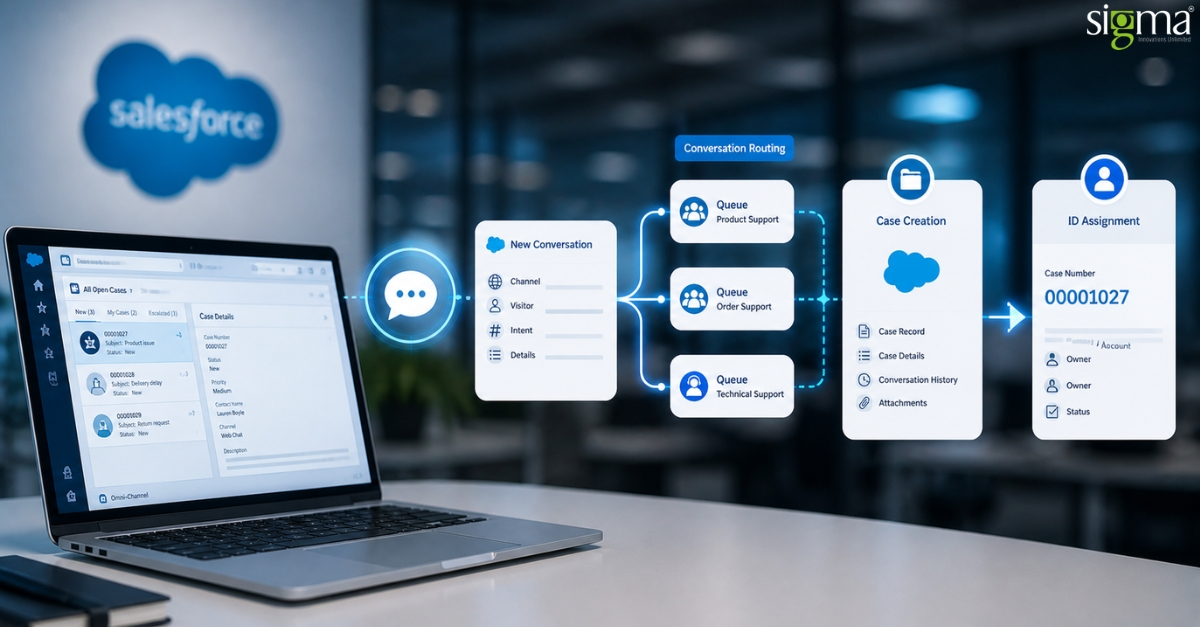
Salesforce Chat Decoded: Case Creation, Conversation Routing, and ID Assignment Explained for Enterprise Support Teams
Key Takeaways
- Default chat setups create “identity amnesia.” If your IDs don’t talk to each other, your reporting is lying to you. We help you build a unified architecture that keeps the story straight.
- Basic queues are a relic. Leveraging advanced Salesforce Omni-Channel routing means your experts spend time solving problems, not hunting for context.
- You can’t run a Ferrari on a dirt road. A clean data model is the only way to power tools like Agentforce. Sigma’s “architecture-first approach” ensures you’re ready for the AI era today.
Most enterprise leaders think their support setup is fine because it seems to work on the surface. A customer clicks a button, a window pops up, and an agent answers. But in the world of high-stakes B2B support, “it works” is often a mask for a ticking time bomb. Many teams fall into the trap of treating the Salesforce chat session, the routing rules, and the final case record as three totally separate things. When these layers don’t talk to each other perfectly, your data starts to fragment. By next year, experts predict that “companies with disconnected data silos will spend 40% more on operational ‘fix-it’ tasks” than those with unified architectures.
At Sigma Infosolutions, we see this invisible failure pattern all the time. It’s not just a minor setup mistake, but a deep-rooted Salesforce Cloud architecture problem. If your chat IDs don’t line up with your case history, your reporting breaks, and your future AI tools like Agentforce won’t have the context they need to be smart. This is exactly why mid-to-large enterprises partner with our Salesforce Consulting Services to clean up the mess before it scales. When you invest in professional Salesforce Services, you aren’t just buying a tool, but building a foundation that won’t crumble when your ticket volume doubles.
This blog isn’t just another list of features. We are giving you a full, end-to-end technical reference for the chat session lifecycle. We’re going to look at how a session starts, how the Live Chat Transcript object records the data, and how a Salesforce case management system should actually behave. Think of this as your roadmap to move away from “good enough” and toward a high-performance engine that handles every customer interaction with precision. To understand what breaks, you first need to see how the system actually behaves under the hood.
Struggling with fragmented support data and disconnected Service Cloud workflows?
Why Default Salesforce Service Cloud Chat Setups Fail at Scale
The choice to stick with “standard” settings for your Salesforce chat might seem like the fastest way to get started, but it is a silent killer for big support teams. Many B2B companies simply turn on basic Omni-Channel queues and generic Salesforce chat forms, assuming the Salesforce case management system will just figure things out. This is a big mistake!
Without a solid Salesforce Cloud architecture, your Salesforce Service Cloud chat will create broken Salesforce Messaging Session records that don’t talk to each other. This lack of smart Salesforce Omni-Channel routing means your customers’ history is scattered like a puzzle with missing pieces.
- Broken Salesforce Messaging Session IDs create double work by making duplicate customer records.
- The Live Chat Transcript object often triggers cases at the wrong time, so agents lose the story.
- Skill-based routing in Service Cloud fails when it isn’t tied into a single, clean data plan.
When your Service Cloud routing logic is this messy, your data is basically invisible. Experts say that by 2028, companies with messy data will see a “50% drop in their AI’s value”. If you aren’t getting professional Salesforce Service Cloud consulting, you are just building up a bill you’ll have to pay later. Every broken ID in your Salesforce chat today is a very expensive data cleanup project for tomorrow.
Mastering the Salesforce Chat Lifecycle: From Session to Record
To build a support engine that actually scales, you have to stop looking at your Salesforce chat as a bunch of random pop-ups. Instead, think of it like a relay race where the baton is the customer’s data. If the baton gets dropped between runners, you lose the race. In a high-end Salesforce Cloud architecture, this “race” is actually a five-stage chat session lifecycle that turns a quick question into a permanent record in your Salesforce case management system.
Most teams get confused here, but it’s simpler if you see these as steps in one single journey:
- Session Initiation: This is where the Salesforce Messaging Session or pre-chat form starts.
- Conversation ID Assignment: The system gives the chat a “name tag” so it knows who is talking.
- Omni-Channel Routing Execution: The Routing Configuration decides which agent is free and skilled enough to help.
- Case Creation Trigger: This is where the Salesforce Service Cloud chat turns into a real ticket.
- Transcript Persistence: The Live Chat Transcript object saves the whole talk and links it to the right Contact and Account.
The secret sauce is how the IDs move across these layers. If the ID isn’t passed correctly, your Service Cloud routing logic won’t know that the person chatting is the same person who emailed yesterday. By next year, companies that master this unified data flow are expected to see a 35% increase in “First Contact Resolution” rates. It’s not just about finishing the chat; it’s about making sure every Salesforce Conversation Entry is part of a bigger, cleaner picture.
Solving ID Fragmentation in Your Salesforce Case Management System
Let’s look under the hood of a Salesforce chat. Think of identifiers as the passports for your data. In a typical setup, you have a Session ID (which only lives while the chat window is open), a Conversation ID (which tracks the whole back-and-forth), and a Case ID (the final ticket). The tricky part of your Salesforce case management system is deciding how these passports work together.
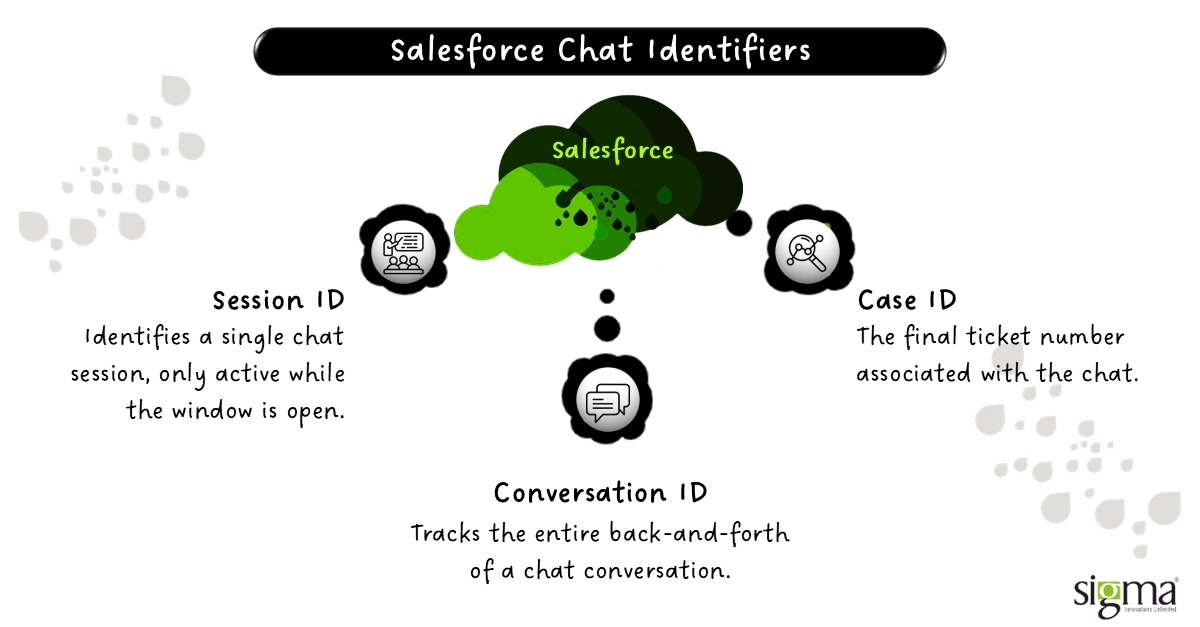
When your Salesforce Conversation Entry gets a brand-new ID every time a customer says hello, your data stays clean, but the customer’s journey gets heavily fragmented. If you reuse IDs, you get a beautiful, unified history, but you need strict rules to keep it organized. Common mistakes happen when companies rely purely on the Live Chat Transcript object ID and forget to map it to their outside systems. This completely breaks the chat session lifecycle.
- Unique IDs: Create isolated interactions, making it hard to see the big picture.
- Reused IDs: Build a unified history, but require tight data governance.
A smart move is to create a persistent conversation layer. This means one master conversation can hold multiple transcripts, which then connect perfectly to your cases. Industry analysts predict that by the end of this year, “60% of top-tier B2B support centers” will require these advanced ID strategies just to run basic AI tools effectively. Getting your ID strategy right isn’t just about technical cleanup, but giving decision-makers the competitive advantage of having flawless, actionable analytics.
How Headless Salesforce architectures are reshaping customer access? Read the blog: Salesforce Headless 360: Why “Logging In” Is Becoming Optional
Advanced Salesforce Omni-Channel Routing: Moving Beyond Basic Queues
Moving past basic Omni-Channel queues means treating your Salesforce chat like a highly intelligent air traffic control tower. A basic setup simply drops incoming messages into a waiting line. However, an advanced system looks at the Service Channel to see what type of work is coming in, checks the agent’s Presence Status, and uses a Capacity Model to balance the workload fairly. The real magic happens inside the Routing Configuration, which decides whether to hand the conversation to the agent who has been waiting the longest or the one with the fewest active chats.
For B2B decision-makers, getting this right provides a massive competitive advantage. Poor Service Cloud routing logic doesn’t just make your customers wait, but wastes your most expensive, highly-trained experts on simple password resets.
Forward-thinking companies use Omni-Channel Flows to evaluate a customer’s value or SLA tier before triggering skill-based routing in Service Cloud to find the perfect agent. In fact, industry analysts predict that by 2029, enterprises utilizing dynamic Salesforce Omni-Channel routing will “reduce expert misallocations by up to 45%”.
Here is how the evolution of routing looks:
- Queue-based routing: The old way; simply drops chats into a first-come, first-served line.
- Skills-based routing: A smarter approach; matches the specific problem to an agent’s unique talents.
- Flow-driven routing: The enterprise standard because it acts as a smart brain that evaluates CRM data before routing.
But routing alone doesn’t create system-of-record value—case creation does.
Also, read the blog – Salesforce Flow for Lead Nurturing: How to Automate Follow-Ups and Drive More Conversions
Optimizing Case Creation with Salesforce Service Cloud Consulting
When it comes to your Salesforce chat, deciding exactly when a ticket gets made is often the most misconfigured layer in a Salesforce case management system. For B2B decision-makers, treating this step as a total afterthought is a massive risk. If you treat case creation as just a minor “side effect” rather than a strict architectural choice, your data strategy will inevitably fail.
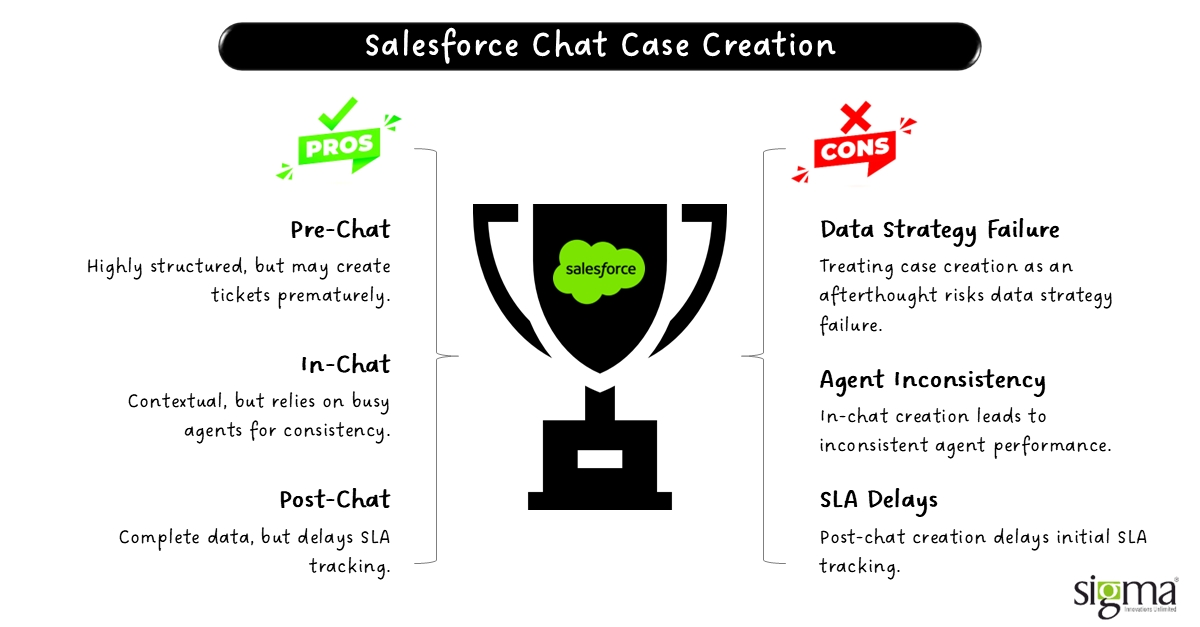
You generally have three main choices on when to pull the trigger:
- Pre-chat: Highly structured but often premature, as you create a ticket before knowing the real issue.
- In-chat: Very contextual but relies heavily on busy agents, making it inconsistent.
- Post-chat: Provides complete data, but it slightly delays your initial SLA tracking.
Deciding between these options depends heavily on your reporting needs and your company’s automation maturity. Most teams use the declarative Flow Builder for easy tweaks, while top-tier setups rely on programmatic Apex code for raw performance and control. By 2030, analysts forecast that “70% of enterprise support delays will stem from poorly timed automation triggers” rather than actual software bugs.
Fixing exactly how your Salesforce Service Cloud chat triggers these tickets is crucial for gaining a competitive advantage. It dictates how cleanly your Live Chat Transcript object binds to the rest of your business data.
Read our success story: Transforming Dealer Onboarding with Salesforce–Lending Platform Integration for a Finance Company
Transcript Handling & Data Model for Building the Digital Thread
The final anchor of your chat session lifecycle is the data model. When a Salesforce chat ends, the system must tightly connect the Live Chat Transcript object to the final ticket. However, true enterprise power comes from building a complete “Digital Thread.” This involves setting up custom reverse lookups so your Salesforce case management system can easily pull every conversation tied to a single issue.
For B2B decision-makers, creating this digital thread provides a vital competitive advantage. If your Salesforce Cloud architecture lacks these solid connections, your historical data becomes a dead end, completely useless for audits, compliance, or training AI tools. In fact, by 2028, enterprises with “unified data threads” are projected to deploy intelligent automation 60% faster than competitors with broken data logs.
To guarantee your data is ready for the future, your setup must capture:
- Perfect Contact mapping for every single Salesforce Messaging Session.
- Complete records of all Service Cloud routing logic decisions and metadata.
At this point, the architecture decisions you’ve made are either enabling scale—or locking you into future rework.
Architecture Decisions That Become Expensive to Undo
In the world of Salesforce Cloud architecture, small choices lead to massive bills. What looks like a quick “setup” button today often becomes a permanent structural flaw tomorrow. B2B decision-makers must realize that an incorrect ID strategy or a messy Service Cloud routing logic is not just a bug, but a technical debt that gains interest every single day. If you choose a session-based ID over a persistent conversation model now, you are essentially signing up for a million-dollar data migration project three years down the line.
The stakes have never been higher. With the rise of Agentforce and Data Cloud, your systems now demand perfectly unified datasets. If your Salesforce chat triggers cases at the wrong time, your AI will be “hallucinating” because it lacks the full story. Industry experts suggest that by 2028, enterprises with fragmented data models will spend three times more on AI integration than those with a clean “Digital Thread“. What looks like a configuration choice today is actually the core architecture of your future.
Read our success story – Unifying Multi-Org Operations with Salesforce-to-Salesforce Integration for a Specialty Finance Company
The Sigma Framework for Designing a Unified Chat-to-Case Engine
At Sigma, we don’t just “turn on” features, but build high-performance support engines. Our framework moves away from the dangerous implementation-first mindset and focuses on architecture-first consulting. We ensure your Salesforce chat is integrated through a lifecycle-first design. This means we prioritize a persistent ID strategy and a sophisticated Routing Configuration that uses Flow-based orchestration rather than basic, static queues.
By focusing on how the Live Chat Transcript object links to your broader Salesforce case management system, we create a foundation ready for any AI or automation tool you want to launch. Our approach ensures:
- Clean, audit-ready analytics.
- Skill-based routing in Service Cloud that actually matches agent expertise.
- A data model that turns every Salesforce Conversation Entry into a strategic asset.
Wrapping Up
Salesforce chat is not just a tool you add to a website, but a complex system of interconnected decisions. For enterprise support teams, the risk of fragmentation is real, and it’s expensive. Choosing to ignore the deep plumbing of your Salesforce Service Cloud chat today will ensure an expensive transformation project tomorrow. To gain a true competitive advantage, you must shift from a “setup mindset” to a “strategic architecture mindset.”
As a leader in Salesforce Consulting Services, our Salesforce experts act as the bridge between basic functionality and enterprise-grade excellence. We help organizations build scalable, cloud-native systems that don’t just work, but win.
Frequently Asked Questions (FAQs)
1. How does Salesforce chat routing work under the hood?
It functions through a specialized engine called Omni-Channel. When a chat is initiated, the system looks at the Routing Configuration to determine priority and size. It then checks the Service Channel settings against agent Presence Status and available capacity to push the work to the most qualified, available agent in real-time.
2. Can you explain the Salesforce chat transcript data model?
The data model centers on the Live Chat Transcript object. This object acts as the glue, linking the Messaging Session (the interaction) to the Contact (the person) and the Case (the business record). A robust architecture ensures that custom lookups are used to maintain a “digital thread” even if a session is disconnected.
3. How does Omni-Channel routing work specifically in Service Cloud?
It uses either Queue-based (simple first-in, first-out) or Skills-based (matching attributes) logic. Service Cloud evaluates the “work item,” determines the required skills via Omni-Channel Flows, and assigns it to an agent whose Capacity Model allows for more work, ensuring no single agent is overwhelmed.
4. How do I configure skill-based routing in Salesforce?
First, define Skills (e.g., “Spanish” or “Technical Tier 2”) and assign them to Service Resources (agents). Then, create Skill Requirements for your work items. Finally, use an Omni-Channel Flow to look up the customer’s needs and route the chat to the agent whose skill set matches the requirements.